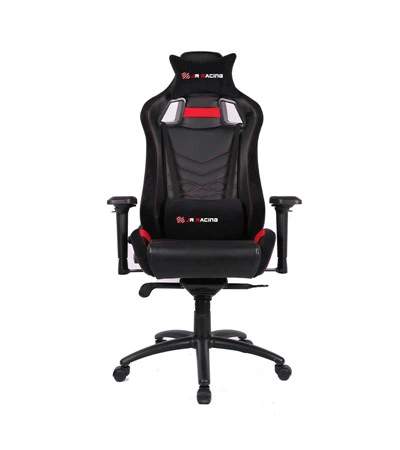
When it comes to the world of PC gaming, having a high - quality reclining gaming chair can significantly enhance the gaming experience. As a supplier of reclining PC gaming chairs, I've had the opportunity to closely examine and understand the various aspects that set different chairs apart. In this blog, I'll share how I compare different reclining PC gaming chairs, which can also help you make an informed decision when purchasing one.
1. Ergonomics
Ergonomics is perhaps the most crucial factor when comparing reclining PC gaming chairs. Long hours of gaming can take a toll on your body, especially your back, neck, and shoulders. A well - designed chair should support the natural curvature of your spine.


Look for chairs with adjustable lumbar support. This feature allows you to customize the level of support according to your body shape and sitting position. Some chairs come with built - in lumbar pillows that can be adjusted up and down, while others have more advanced mechanisms that can be fine - tuned for firmness.
The headrest is another important ergonomic element. A good headrest should be adjustable in height and angle, so you can position it to support your neck comfortably. It should also be made of soft, yet supportive material to prevent neck strain.
Seat depth is also a key consideration. If the seat is too deep, your legs won't be properly supported, which can lead to circulation problems. On the other hand, a seat that is too shallow won't provide enough support for your thighs. A seat with adjustable depth can accommodate different body sizes and sitting preferences. For more information on related gaming products, you can check out Sofa Chair Gaming.
2. Reclining Mechanism
The reclining mechanism is what makes a reclining PC gaming chair unique. There are several types of reclining mechanisms to consider.
The most basic type is the manual recline. This usually involves a lever that you pull to adjust the angle of the chair. Manual reclines are simple and reliable, but they may not offer as much precision as other types.
Pneumatic reclines are more common in mid - to high - end gaming chairs. They use air pressure to adjust the recline angle, allowing for smoother and more precise adjustments. You can easily lock the chair at your desired angle, and some pneumatic reclines also offer a rocking function.
Some high - end chairs come with electric reclining mechanisms. These are the most convenient, as you can adjust the recline angle with the push of a button. They often offer a wider range of recline angles and can be integrated with other features, such as massage functions.
3. Build Quality and Materials
The build quality of a reclining PC gaming chair is essential for its durability. Look for chairs with a sturdy frame, usually made of metal or high - quality plastic. The frame should be able to withstand the weight and movement associated with gaming.
The upholstery is also an important factor. Leather and faux - leather are popular choices for gaming chairs. Leather is durable, easy to clean, and has a luxurious look. However, it can be expensive and may get hot in long gaming sessions. Faux - leather is a more affordable alternative that offers similar looks and is often more breathable.
The padding of the chair should be thick and supportive. High - density foam is a good choice, as it retains its shape over time and provides better support than low - density foam. Check the stitching on the chair as well; loose or uneven stitching can be a sign of poor craftsmanship.
4. Adjustability
In addition to the ergonomic adjustments mentioned earlier, a good reclining PC gaming chair should offer a wide range of other adjustments. Armrests are a prime example. Adjustable armrests can be moved up and down, left and right, and sometimes even forward and backward. This allows you to position your arms comfortably while gaming, reducing the risk of shoulder and elbow strain.
The height of the chair is also adjustable. You should be able to adjust the chair so that your feet rest flat on the ground and your knees are at a 90 - degree angle. This helps maintain proper blood circulation and reduces pressure on your lower back.
Some chairs also offer tilt tension adjustment. This allows you to control how easily the chair reclines and rocks. If you prefer a more stable chair, you can increase the tilt tension, while a lower tilt tension allows for more movement.
5. Additional Features
Many reclining PC gaming chairs come with additional features that can enhance the gaming experience. Some chairs have built - in massage functions, which can help relieve muscle tension during long gaming sessions. These massage functions often include different modes, such as vibration, rolling, and kneading.
Some chairs are equipped with speakers and a subwoofer. This can immerse you in the game's audio, providing a more engaging experience. However, keep in mind that chairs with audio features may be more expensive and may require additional power sources.
There are also chairs with built - in USB ports, which can be used to charge your gaming devices, such as controllers or smartphones. This adds to the convenience of using the chair during gaming.
6. Compatibility with Gaming Setups
When comparing reclining PC gaming chairs, it's important to consider how well they will fit into your gaming setup. If you have a Master Gaming Desk With Drawer, you need to make sure the chair's height and width are compatible with the desk.
The chair should also be able to move freely around your gaming area. Consider the size of the chair's base and the casters. Larger casters can move more easily on different types of flooring, while a wider base provides more stability.
7. Aesthetics
While aesthetics may not be as important as the other factors, they can still play a role in your decision. Gaming chairs come in a variety of colors and styles. You can choose a chair that matches your gaming setup or your personal taste. For example, if you like a more classic look, you might prefer a Gaming Chair Brown. If you want a more modern and flashy look, there are chairs with bright colors and LED lighting.
Conclusion
Comparing different reclining PC gaming chairs involves considering multiple factors, from ergonomics and reclining mechanisms to build quality and additional features. By carefully evaluating these aspects, you can find a chair that not only provides comfort but also enhances your gaming experience.
If you're in the market for a reclining PC gaming chair, I encourage you to reach out for a detailed discussion. Whether you're a professional gamer, a casual player, or a retailer looking to stock high - quality gaming chairs, I can provide you with the information and options you need. Contact me to start a procurement negotiation and find the perfect reclining PC gaming chair for your needs.
References
- "Ergonomics in Gaming Chairs: A Review", Journal of Gaming Health
- "The Future of Reclining Mechanisms in Gaming Furniture", Furniture Design Magazine
- "Materials and Build Quality in Gaming Chairs", Industrial Materials Research Journal