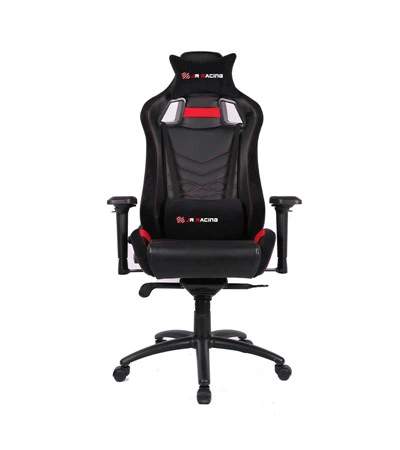
Maintaining the leather of a PU leather gaming chair is crucial for both its aesthetic appeal and longevity. As a supplier of high - quality PU leather gaming chairs, I understand the importance of providing customers with the right knowledge to keep their chairs in top - notch condition. In this blog, I'll share some effective ways to maintain the leather of your PU leather gaming chair.
Understanding PU Leather
PU leather, or polyurethane leather, is a synthetic alternative to genuine leather. It offers several advantages, such as being more affordable, easier to clean, and having a more consistent appearance. However, it also has its own set of care requirements. Unlike genuine leather, which is a natural material, PU leather is a man - made product that can be more prone to damage from certain chemicals and extreme conditions.
Regular Cleaning
One of the most basic yet essential steps in maintaining your PU leather gaming chair is regular cleaning. Dust, dirt, and sweat can accumulate on the surface of the chair over time, which not only makes it look dirty but can also cause the leather to degrade.


To clean your chair, start by using a soft, dry cloth to wipe away any loose dirt or dust. This can prevent scratches when you move on to the next step. Next, mix a small amount of mild soap with warm water. A gentle dish soap or a specialized leather cleaner is ideal. Dip a clean, soft cloth into the soapy water, wring it out well so that it's only slightly damp, and then gently wipe the surface of the chair.
Avoid using abrasive materials, such as rough sponges or scrub brushes, as these can scratch the PU leather. Also, never soak the leather in water or use excessive amounts of liquid, as this can cause the leather to warp or lose its shape. After cleaning, use a dry cloth to wipe away any remaining moisture and let the chair air dry completely.
Protecting from Sunlight and Heat
Exposure to direct sunlight and high temperatures can have a detrimental effect on PU leather. Sunlight can cause the color of the leather to fade over time, while excessive heat can make the leather dry and brittle, leading to cracks.
It's best to place your gaming chair away from windows or other areas where it will be exposed to direct sunlight for long periods. If you can't avoid placing it near a window, consider using curtains or blinds to block the sunlight during the hottest parts of the day.
Similarly, keep your chair away from heat sources such as radiators, heaters, or fireplaces. High temperatures can cause the PU leather to expand and contract, which can weaken its structure and cause it to break down more quickly.
Conditioning the Leather
Although PU leather doesn't require conditioning as often as genuine leather, it can still benefit from occasional treatment. Conditioning helps to keep the leather soft, supple, and resistant to cracking.
There are many commercial leather conditioners available on the market. Look for a conditioner that is specifically designed for PU leather. Before applying the conditioner, make sure the chair is clean and dry. Apply a small amount of the conditioner to a soft cloth and then gently rub it into the leather in a circular motion. Pay special attention to areas that are prone to wear and tear, such as the armrests and the seat.
Let the conditioner soak into the leather for the recommended amount of time, usually a few minutes, and then wipe away any excess with a clean cloth. Conditioning your chair every few months can help to extend its lifespan and keep it looking new.
Avoiding Sharp Objects
PU leather can be easily scratched by sharp objects. To prevent damage, avoid placing sharp items such as knives, scissors, or keys on the chair. Also, be careful when moving objects around the chair to prevent accidental scratches.
If you have pets, make sure they don't scratch or claw at the chair. You can use a pet - friendly deterrent spray or cover the chair with a protective blanket when you're not using it.
Handling Stains
Despite your best efforts, stains may still occur on your PU leather gaming chair. The key to removing stains is to act quickly.
For minor stains, such as spills from water or coffee, follow the regular cleaning procedure with mild soap and water. If the stain persists, you can try using a specialized leather stain remover. Make sure to test the stain remover on a small, inconspicuous area of the chair first to ensure that it doesn't damage the leather.
For more stubborn stains, such as ink or grease, it may be necessary to seek professional help. A professional leather cleaner will have the expertise and tools to remove the stain without causing damage to the leather.
Complementary Products for Your Gaming Setup
In addition to maintaining your gaming chair, you might also be interested in other products to enhance your gaming experience. We offer a range of high - quality gaming furniture, including the Elementary Gaming Desk With Drawer, which provides a spacious and organized workspace for your gaming gear. Our Original Leader Racing Chair offers excellent support and comfort, similar to our PU leather gaming chairs. And if you're looking for a more relaxed gaming option, our Gaming Sofa Chair Lounger is a great choice.
Contact for Purchase and Consultation
If you're interested in purchasing our PU leather gaming chairs or any of our other gaming furniture, or if you have any questions about leather maintenance, we're here to help. We have a team of experts who can provide you with detailed information and guidance. Whether you're a professional gamer looking for the perfect setup or a casual player wanting to upgrade your gaming experience, we can assist you in finding the right products for your needs. Don't hesitate to reach out to us for more information and to start the procurement process.
References
- "Leather Care Guide", Leather Industry Association
- "Synthetic Leather: Properties and Care", Journal of Materials Science and Design